ograf
EBU OGraf Graphics specification
About
EBU OGraf is a specification for Web-based Broadcast Graphics. It allows users to create a Graphic once and use it in multiple compatible Graphic renderers.
(For the OGraf Server API, see Server API.)
Introduction
A Web-based Graphic is implemented using standardized Web technologies (e.g. HTML, Javascript, CSS, Canvas, Web Components, …) and can be rendered with engines implementing these Web technologies (e.g. browsers or browser engines such as Blink and WebKit).
A Web-based Graphics workflow typically consists of the following components (see figure below):
- Editor: an application or service where a user can create and edit Graphics.
- Controller: a user interface or automation layer controlling the playout of the Graphics.
- Server: provides the API endpoints for the controllers and editors. They consist of managing graphics (importing/exporting/listing graphics) and graphics control (i.e. playout of the graphics). The latter is done by sending/receiving commands to/from the Renderer.
- Renderer: is able to render one or more Web-based graphic instances. Based on incoming commands from the Server, a Graphic is animated in, updated or animated out. In order to achieve this, communication between the Renderer and the Graphic instance is necessary.
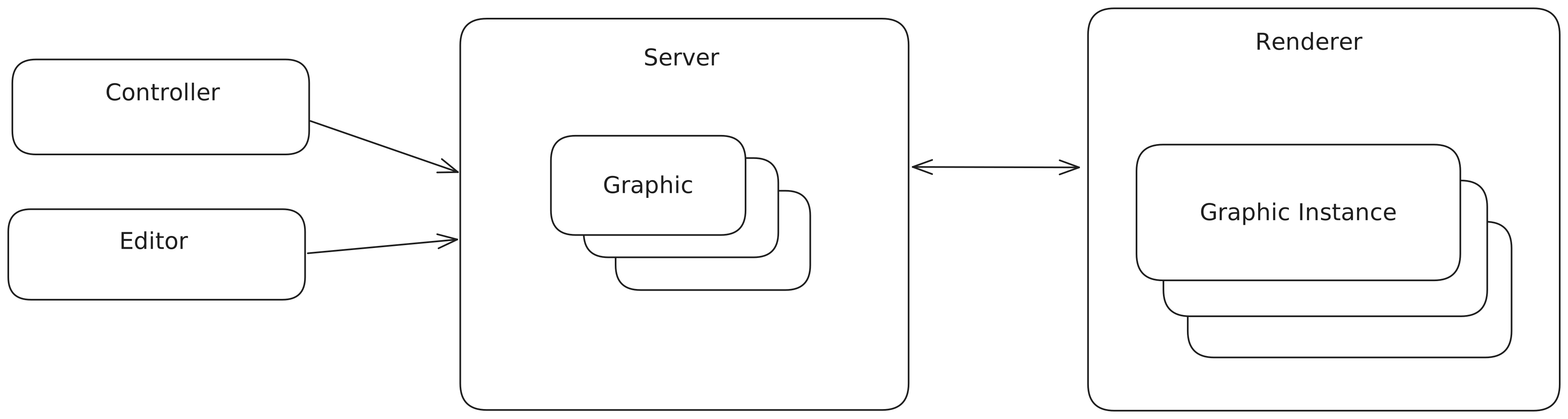
Although vendors usually provide all components in one solution, allowing optionally third-party Editors and Controllers (typically automation layers), it is certainly possible to see each of the different parts (Editor, Controller, Server, and Renderer) coming from different vendors.
The scope of this specification is the format definition of a Graphic and how a Renderer should interpret this format in order to render the Graphic. Graphic creators (developers and tools) producing Graphics compatible with this format are guaranteed that these Graphics can be rendered in compliant Renderers. This enables more straightforward exchanges between different Web-based graphic engine solutions and can support use cases such as marketplaces for Web-based Graphics.
Use of Normative Language
The key words “MUST”, “MUST NOT”, “REQUIRED”, “SHALL”, “SHALL NOT”, “SHOULD”, “SHOULD NOT”, “RECOMMENDED”, “MAY”, and “OPTIONAL” in this document are to be interpreted as described in RFC 2119.
Requirements for a Graphic
A Graphic MUST consist of the following files:
- a JSON file containing metadata about the Graphic, referred to as the Manifest file. See Manifest Model for more information.
- a Javascript file that exports the Graphic Web Component. The Manifest file MUST contain a reference to this Javascript file. See Web Component Interface for more information.
- any resources used by the Graphic, such as images, videos, fonts, etc. These resources MAY be organised in a folder structure.
The Manifest file SHOULD be considered as the representation and entrypoint for the Graphic, all other files are either directly or indirectly referenced from the Manifest file and can be seen as dependencies.
Manifest Model
The manifest file is a JSON file containing metadata about the Graphic.
The file name of the manifest file MUST end with .ograf.json (e.g. my-graphic.ograf.json).
It consists of the following fields:
| Field | Type | Required | Default | Description |
|---|---|---|---|---|
| $schema | string | X | MUST be the string “https://ograf.ebu.io/v1/specification/json-schemas/graphics/schema.json”. This doubles as a reference to the JSON Schema of the manifest file as well as a OGraf version. |
|
| id | string | X | A unique identifier for the Graphic. Can consist of any unicode character, except “/” (forward slash). | |
| version | string | A version descriptor of the Graphic. The versioning scheme is beyond the scope of this specification. | ||
| name | string | X | The name of the Graphic. | |
| description | string | A longer description of the Graphic. | ||
| author | Author | An object providing information about the author of the Graphic. When provided, the object MUST contain a name field and MAY contain an email and url field. |
||
| main | string | X | Reference to the Javascript file that exports the Graphic Web Component. | |
| customActions | Action[] | An array of Action objects. They correspond to the custom actions that can be invoked on the Graphic. See below for details about the fields inside an Action. |
||
| actionDurations | ActionDuration[] | An array of ActionDuration objects. They describe the static animation durations of actions, expressed in milliseconds. |
||
| supportsRealTime | boolean | X | Indicates whether the Graphic supports real-time rendering. | |
| supportsNonRealTime | boolean | X | Indicates whether the Graphic supports non-real-time rendering. If true, the Graphic MUST implement the non-real-time functions goToTime() and setActionsSchedule(). |
|
| schema | object | The JSON schema definition for the data argument to the load() and updateAction() methods. This schema can be seen as the (public) state model of the Graphic. Properties in this schema MAY include an optional hidden (boolean) attribute; when hidden is true, the property’s value SHOULD NOT be included when building a display name or label for the Graphic in a GUI (e.g. in playout or automation UIs). |
||
| stepCount | integer | 1 | The number of steps a Graphic consists of. If the Graphic is simply triggered by a play, then a stop, this is considered a stepCount of 1 (which is the default behavior if left undefined). A value of -1 indicates that a Graphic has a dynamic or unknown number of steps. | |
| renderRequirements | RenderRequirement[] | A list of requirements that this Graphic has for the rendering environment. At least one of the requirements must be met for the graphic to be expected to work. | ||
| thumbnails | Thumbnail[] | Optional array of thumbnail entries. Each entry has file (path to image; PNG, JPG, GIF, or webp) and optionally resolution (object with width and height in pixels). |
There MAY be multiple manifest files in a folder. In the case of multiple manifest files, they will be interpreted as multiple, independent Graphics. This can be useful for example when having a package of multiple OGraf graphics, which then might share resources such as images, fonts, etc.
Real-time vs. non-real-time
Real-time rendering of a Graphic means that the Graphic is animated at real-time speed, typically in the context of live TV.
Non-real-time rendering has no requirement on the speed of rendering, it can be slower or faster than real-time and is
typically used in post-production scenarios. A Graphic MUST be either marked as real-time, non-real-time or both,
by means of the supportsRealTime and supportsNonRealTime fields.
In case of a non-real-time Graphic, there are two additional functions that need to be implemented by the Graphic:
goToTime() and setActionsSchedule() (see Web Component Interface for their definition).
Step model
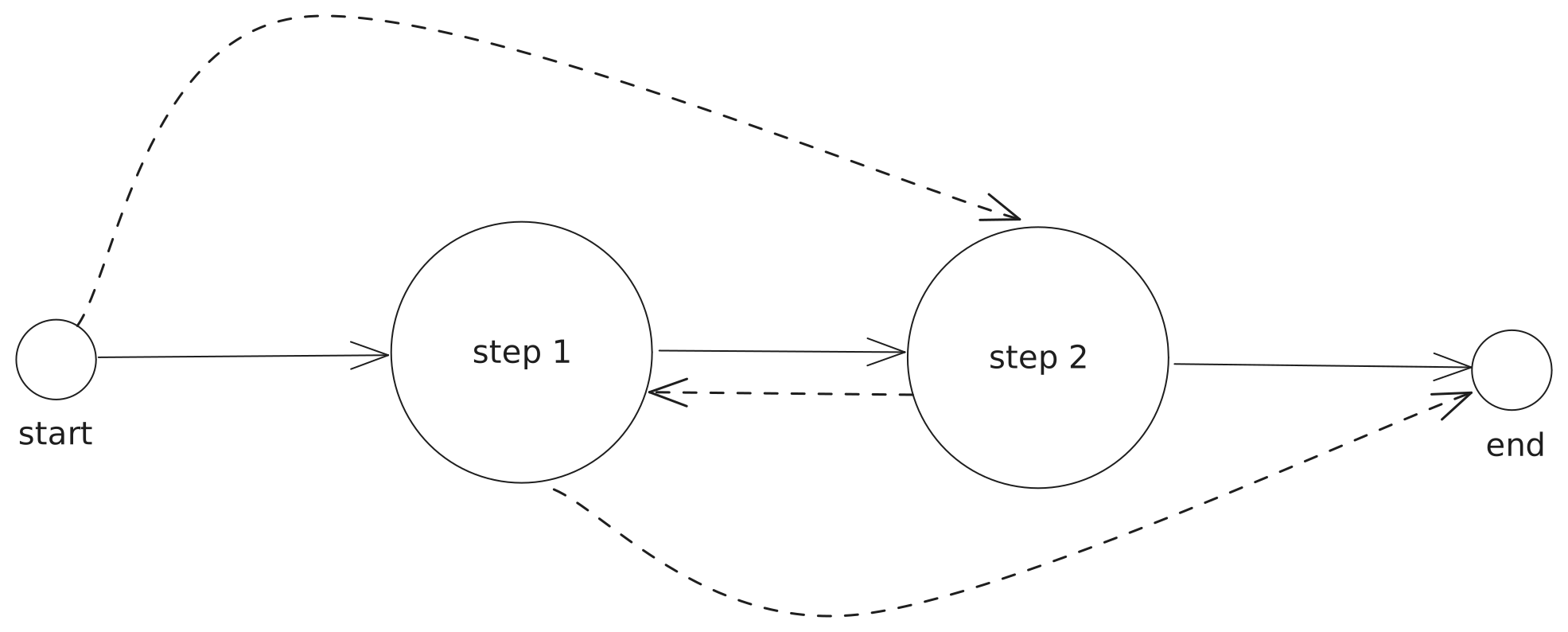
A Graphic contains zero or more steps. Steps numbers are 0-based, meaning that the first step is step 0. A step can be defined as a ‘paused’ state of the Graphic. Going from one step to another is done via a transition (with or without animation). The figure below shows three example step models. Every model has a start and an end node. The start node represents the start of a Graphic rendering, where typically nothing is visible in the rendered output. Similarly, the end node represents the end of the Graphic rendering, also typically nothing visible in the rendered output at that moment. The arrows between the nodes represent the transitions.
The first model represents a Graphic containing zero steps. When playAction() is called on this Graphic, it will
animate the Graphic in and after some predefined time the Graphic will animate out automatically.

The second model represents a Graphic containing one step. When playAction() is called on this Graphic, it will
animate the Graphic in and will pause at step 0. Pausing here doesn’t mean that the Graphic is not moving, it refers to
the fact that there is an interaction necessary with the Graphic to move to the next step (in this case the end).
The stopAction() function SHOULD be used to go to the end of the Graphic.

The third model represents a multi-step Graphic containing two steps. It is similar to the one-step model,
but now the playAction() function MUST be used again to transition between different steps, except for the end node,
where the stopAction() function SHOULD be used. The normal flow is to go to step 0, then to step 1 and finally to the
end node. However, it is possible that you transition to any step or directly to the end node (indicated by the dotted
lines in the figure).
In the Graphic Manifest, the stepCount property is used to describe the step model of a Graphic:
| stepCount | Description | Controller SHOULD display step controls* |
|---|---|---|
-1 |
The Graphic has a dynamic/unknown number of steps. | Yes |
0 |
The Graphic has no steps, it is a simple Graphic that can be played once. (This is the first model as described above) | No |
undefinedor 1 |
The Graphic has a single step (This is the second model above) | No |
>1 |
The Graphic has (a known number of) multiple steps (This is the third model above) | Yes |
*Note: “step controls” are controls that allow a user to navigate between steps, such as “next step”, “previous step”, “go to step X”, etc.
Action durations
Action durations are optional metadata that allows predicting how long action animations
take. Durations are expressed as integer milliseconds. A duration of 0 means that there is no animation duration, and
a duration of -1 indicates that the duration is dynamic or unknown. The values describe the normal animated execution
of an action, not the behavior when skipAnimation is set to true.
The ActionDuration object contains the following fields:
| Field | Type | Required | Default | Description |
|---|---|---|---|---|
| type | string | X | The action type. MUST be one of playAction, updateAction, stopAction or customAction. |
|
| duration | integer | X | The animation duration in milliseconds. A value of -1 indicates a dynamic or unknown duration. |
|
| customActionId | string | Required when type is customAction. MUST refer to the id of an Action in customActions. |
||
| steps | ActionStepDuration[] | Optional step-specific durations for playAction. |
For non-custom actions, there MUST be at most one ActionDuration object per type. For custom actions, there MUST be
at most one ActionDuration object per customActionId.
For playAction, the steps field MAY be used when different target steps have different animation durations. The
step field is zero-based, matching the goto field of playAction(). A step duration without a step field is the
fallback for target steps not explicitly listed. When determining the duration of a playAction, the matching order is:
an exact step match, then a fallback step duration without step, then the action-level duration.
Custom actions
A custom action is an action that is specific for a particular Graphic. It is a mechanism to support any action
a Graphic can execute. The Manifest file defines the custom actions by means of the actions field. It represents
a Map where the keys correspond to the id of the custom action and the values are Action objects. The Action object
supports the following fields:
| Field | Type | Required | Default | Description |
|---|---|---|---|---|
| id | string | X | The identity of the action. The id must be unique within the graphic. | |
| name | string | X | The name of the action (for use in GUIs). | |
| description | string | A longer description of the action. | ||
| schema | object | The JSON schema definition for the payload of the action. |
RenderRequirements
A RenderRequirement in the manifest file is an object that describes which requirements a Graphic has for the rendering environment.
The renderRequirements is a list of RenderRequirements, where at least one requirement must be fulfilled by the renderer for a
Graphic to be expected to work.
The RenderRequirement object contains the following fields:
| Field | Type | Required | Default | Description |
|---|---|---|---|---|
| resolution | object | Object that describes resolution requirements. | ||
| resolution.width | NumberConstraint | Specifies renderer width resolution requirement. | ||
| resolution.height | NumberConstraint | Specifies renderer height resolution requirement. | ||
| frameRate | NumberConstraint | Specifies renderer frameRate requirement. | ||
| accessToPublicInternet | BooleanConstraint | Specifies requirement on whether the renderer has access to the public internet or not. | ||
| engine | EngineRequirement[] | Array of minimum version requirements for the rendering engine |
NumberConstraint
A NumberConstraint is an object that describes a constraints for a numerical value. (This is inspired by https://developer.mozilla.org/en-US/docs/Web/API/MediaTrackConstraints#constraindouble) It contains the following fields:
| Field | Type | Required | Default | Description |
|---|---|---|---|---|
| max | number | A number specifying the largest permissible value of the property it describes. If the value cannot remain equal to or less than this value, matching will fail. | ||
| min | number | A number specifying the smallest permissible value of the property it describes. If the value cannot remain equal to or greater than this value, matching will fail. | ||
| exact | number | A number specifying a specific, required, value the property must have to be considered acceptable. | ||
| ideal | number | A number specifying an ideal value for the property. If possible, this value will be used, but if it’s not possible, the user agent will use the closest possible match. |
StringConstraint
A StringConstraint is an object that describes a constraints for a textual value. (This is inspired by https://developer.mozilla.org/en-US/docs/Web/API/MediaTrackConstraints#constraindouble) It contains the following fields:
| Field | Type | Required | Default | Description |
|---|---|---|---|---|
| exact | string | A string specifying a specific, required, value the property must have to be considered acceptable. | ||
| ideal | string, string[] | A string (or an array of strings), specifying ideal values for the property. If possible, one of the listed values will be used, but if it’s not possible, the user agent will use the closest possible match. |
BooleanConstraint
A BooleanConstraint is an object that describes a constraints for a boolean value. (This is inspired by https://developer.mozilla.org/en-US/docs/Web/API/MediaTrackConstraints#constrainboolean) It contains the following fields:
| Field | Type | Required | Default | Description |
|---|---|---|---|---|
| exact | boolean | A boolean specifying a specific, required, value the property must have to be considered acceptable. | ||
| ideal | boolean | A boolean specifying an ideal value for the property. If possible, this value will be used, but if it’s not possible, the user agent will use the closest possible match. |
Vendor-specific fields
Vendor-specific fields are additional fields that are not part of this specification, but used for vendor-specific means.
They can occur in the Manifest file or in the payload of the requests/responses for each of the functions in the Web Component.
Every vendor-specific field MUST use the prefix v_. For example, v_editor is a valid vendor-specific field, editor is not a valid field.
Web Component Interface
A Graphic MUST be implemented in the form of a custom HTML element (i.e. a Web Component). The HTML5 Custom Elements specification defines the requirements for such a custom HTML element.
Therefore, the contents of the main Javascript file of a Graphic MUST contain a class that extends from HTMLElement.
Depending on the rendering capabilities (defined in the Manifest file), a Graphic is expected to implement a number of functions.
To describe the functions in this document, the Typescript interface notation is used. For simplicity, we omit the indication
that vendor-specific fields can be included in both request and response payloads.
For the ‘action’ methods (playAction(), stopAction(), updateAction() and customAction()), a Promise MUST be returned that
resolves to undefined or to a ReturnPayload object containing the following fields:
statusCode: a number that corresponds to an HTTP status code (2xx indicates a successful result, 4xx and 5xx indicate an error).statusMessage: an optional human-readable message that corresponds to thestatusCode.result: an optional Graphics-specific response object.
If the returned Promise resolves to undefined, it MUST be treated as a { statusCode: 200 }.
Similarly, for simplicity reasons, we omit these three fields in the description of the functions below. In Typescript interface, the full interface is provided.
Every Graphic MUST implement the following functions.
load()
load: (
  params: {
    data: unknown;
    renderType: "realtime" | "non-realtime";
    renderCharacteristics: RenderCharacteristics;
  } & VendorExtend
) => Promise<ReturnPayload | undefined>;
The load() function is called by the Renderer when the Graphic has been loaded into the DOM. The data field
contains the initial internal state of the Graphic and follows the model described in the Manifest using the
schema field. The Graphic MUST update its internal state with the data received in the load() function.
The renderType field gives the Graphic an indication whether the rendering is done in realtime or non-realtime.
The renderCharacteristics field provides the Graphic a set of characteristics / capabilities of the Renderer, that
could affect how the Graphic will be rendered.
A Promise is returned that MUST resolve when the Graphic is ready to receive ‘action’ methods (playAction(),
stopAction(), updateAction(), customAction()). This way, Renderers are able to implement ‘load-and-play’
scenarios using load({data}).then(() => playAction()).
dispose()
dispose: (params: EmptyParams) => Promise<ReturnPayload>;
The dispose() function is called by the Renderer to force the Graphic to terminate/dispose/clear any loaded resources.
A Promise is returned that MUST resolve when the Graphic completed the necessary cleanup.
playAction()
playAction: (
  params: ({
    goto: number;
    skipAnimation?: boolean;
  } | {
    delta: number;
    skipAnimation?: boolean;
  }) & VendorExtend
) => Promise<PlayActionReturnPayload>;
The playAction() function is called by the Renderer to play a given step.
The skipAnimation field indicates whether the Graphic should transition with or without animation.
When not provided, the skipAnimation field defaults to false. The Graphic MUST skip the animation when
skipAnimation is set to true.
The delta and goto fields indicate the target step. Steps are zero-based indexed. delta is used for relative steps,
goto for an absolute step number. The target step MUST be determined as follows by the Graphic:
- when
gotois not equal toundefinedand greater or equal to 0, the target step is equal to the value provided in thegotofield; - when
gotoisundefined, the target step is calculated as the sum of the current step and the value provided in thedeltafield (which defaults to1when not provided). When the current step is undefined (i.e. when the Graphic is in the ‘start’ state), the target step must be calculated as-1 + delta.
When the target step is higher or equal to the stepCount defined in the Manifest, the Graphic MUST transition to the
end.
The following table shows some examples of target step calculations, based on the internal state of the Graphic and
incoming goto and delta fields. Target step equal to undefined means the Graphic needs to transition to the end.
| current step | stepCount | goto | delta | target step |
|---|---|---|---|---|
| undefined | 1 | undefined | undefined | 0 |
| undefined | 1 | 0 | undefined | 0 |
| undefined | 1 | undefined | 1 | 0 |
| undefined | 2 | 1 | 2 | 1 |
| 0 | 2 | 1 | undefined | 1 |
| 0 | 3 | undefined | 2 | 2 |
| 2 | 3 | 1 | undefined | 1 |
| 2 | 3 | undefined | -2 | 0 |
| 0 | 1 | undefined | 1 | undefined |
The returned Promise MUST resolve to a ReturnPayload object with an additional currentStep field indicating
the current step after the execution of this function.
In case stepCount is equal to zero or the playAction() function is used to transition to the end, the currentStep
field in the response MUST be undefined.
The point in time when the Promise returned by the playAction() function is resolved SHOULD indicate that the graphic
is ready to execute another action. For example, it could be when a graphic has finished animating in (or reached next
step / transitioned between states). If the graphic has a long or infinite animation (like a text-scroller),
the Promise SHOULD NOT wait for that long animation to finish, but instead resolve instantly (or after an in-animation).
stopAction()
stopAction: (
  params: {
    skipAnimation?: boolean
  } & VendorExtend
) => Promise<ReturnPayload | undefined>;
The stopAction() function is called by the Renderer to stop the Graphic from being displayed.
The skipAnimation field indicates whether the Graphic should disappear with or without animation.
When not provided, the skipAnimation field defaults to false. The Graphic MUST skip the animation when
skipAnimation is set to true.
The returned Promise MUST resolve when the Graphic is stopped from being displayed. The point in time when the Promise
returned by the stopAction() function is resolved SHOULD indicate that the graphic is ready to execute another action.
Typically for the stopAction(), it could be when a graphic has finished animating out.
updateAction()
updateAction: (
  params: {
    data: unknown;
    skipAnimation?: boolean;
  } & VendorExtend
) => Promise<ReturnPayload | undefined>;
The updateAction() function is called by the Renderer to update one or more fields of the internal state of the
Graphic. The data field contains a (potentially partial) update of the internal state of the Graphic and follows the
model described in the Manifest using the schema field.
The skipAnimation field indicates whether the Graphic should update with or without animation.
When not provided, the skipAnimation field defaults to false. The Graphic MUST skip the animation when
skipAnimation is set to true.
The returned Promise MUST resolve after the execution of the update. The point in time when the Promise is resolved SHOULD indicate that the graphic is ready to execute another action. Typically, it could be when a graphic has finished an animation of the update.
customAction()
customAction: (
  params: {
    id: string;
    payload: unknown;
    skipAnimation?: boolean;
  } & VendorExtend
) => Promise<ReturnPayload | undefined>;
The customAction() function is called by the Renderer to invoke a custom action on the Graphic. The id field MUST
correspond to an id of an Action that is defined in the Manifest file, inside the actions field. The schema for the
payload field is the described in the corresponding Action inside the Manifest file. The returned Promise MUST
resolve when the action is executed.
The skipAnimation field indicates whether the Graphic should disappear with or without animation.
When not provided, the skipAnimation field defaults to false. The Graphic MUST skip the animation when
skipAnimation is set to true.
The returned Promise MUST resolve after the execution of the update. The point in time when the Promise is resolved SHOULD indicate that the graphic is ready to execute another action. Typically, it could be when a graphic has finished an animation of the action.
Additionally, every non-real-time Graphic MUST implement the following functions.
goToTime()
goToTime: (
  params: { timestamp: number } & VendorExtend
) => Promise<ReturnPayload | undefined>;
The goToTime() function is called to make the Graphic jump to a certain timestamp, expressed in milliseconds.
A Promise is returned that MUST resolve when the frame is rendered at the requested position.
setActionsSchedule()
setActionsSchedule: (
  params: {
    schedule: {
      timestamp: number;
      action:
        | ({
            type: "updateAction";
            params: Parameters<Graphic["updateAction"]>[0];
          } & VendorExtend)
        | ({
            type: "playAction";
            params: Parameters<Graphic["playAction"]>[0];
          } & VendorExtend)
        | ({
            type: "stopAction";
            params: Parameters<Graphic["stopAction"]>[0];
          } & VendorExtend)
        | ({
            type: "customAction";
            params: Parameters<Graphic["customAction"]>[0];
          } & VendorExtend);
    }[];
  } & VendorExtend
) => Promise<EmptyPayload | undefined>;
The setActionsSchedule() function is called to schedule actions to be invoked at a certain point in time. When this
is called, the Graphic is expected to store the scheduled actions and invoke them when the time comes. A call to this
replaces any previous scheduled actions. For every timestamp, expressed in milliseconds, an action type is provided
together with corresponding parameters. The action type is either playAction, stopAction, updateAction or
customAction.
A Promise is returned that MUST resolve when the Graphic received the schedule. The Graphics SHOULD NOT wait to resolve the Promise until the schedule is executed.
The graphic MUST be able to handle calls to the ‘action’ methods at any point in time, regardless of if the Promise
returned by the previous method call has not yet resolved.
The graphic MAY handle multiple subsequent method calls in any way it sees fit. Queueing commands to be executed in
order, aborting a previous animation or “skipping ahead” are all reasonable strategies.
The graphic SHOULD NOT ignore a subsequent method call if the previous one has not yet resolved.
The default export MUST be used to export the class representing the Graphic.
This type of export allows you to import the Graphic using any name.
Requirements for a Renderer
The way a Graphic is added into and removed from a Renderer is non-normative. But there are a few normative steps to take by the Renderer when doing so.
When a Graphic is added into a Renderer, the following steps are executed by the Renderer:
- MUST call the
load()function of the Graphic. - MUST wait for the promise to resolve.
- The Renderer can now start calling the ‘action’ methods
When a Graphic is removed from the Renderer, the following steps are executed by the Renderer:
- MUST call the
dispose()function of the Graphic. - SHOULD wait for the promise to resolve.
JSON Schema for Manifest file
The normative JSON Schema for the Manifest file can be found here.
Typescript interface for Graphic
The informative Typescript interface for the Graphic Web Component can be found here.
Examples
Lower Third
The following manifest describes a simple Lower Third Graphic. It does not contain any custom actions and has one state property: name.
{
  "$schema": "https://ograf.ebu.io/v1/specification/json-schemas/graphics/schema.json",
  "id": "l3rd-name",
  "version": "1.0.0",
  "name": "Lower 3rd - Name",
  "description": "Name lower third",
  "author": {
    "name": "John Doe",
    "email": "john.doe@foo.com"
  },
  "main": "lower-third.mjs",
  "schema": {
    "type": "object",
    "properties": {
      "name": {
        "type": "string",
        "title": "Name",
        "default": "John Doe"
      }
    }
  },
  "supportsRealTime": true,
  "supportsNonRealTime": false
}
The above manifest refers to the Javascript file lower-third.mjs, which is the Web Component implementing this Graphic:
class Graphic extends HTMLElement {
  async load({ data: { name: string } } ) {
    // Load resources and initialize
  }
  async dispose() {
    // Dispose the necessary resources, if any
  }
  async playAction({ delta: number, goto: number, skipAnimation: boolean }) {
    // Play the Graphic according to the incoming params
    return {statusCode: 200, statusMessage: 'OK', currentStep}
  }
  async stopAction({ skipAnimation: boolean }) {
    // Stop the Graphic, with or without animation
    return {statusCode: 200, statusMessage: 'OK'}
  }
  async updateAction({ data: { name: string } }) {
    // Update the state of the Graphic
    return {statusCode: 200, statusMessage: 'OK'}
  }
  async customAction({ id: string, payload: any}) {
    return {statusCode: 400, statusMessage: 'No custom actions supported'}
  }
}

export default Graphic;